7. Architecture / Technical Design
This document summarizes the technical design of the MoH Helpdesk platform for handover, maintenance, and future enhancement.
7.1 System Context
The MoH Helpdesk is a centralized support and ticket management platform used by facility users, regional users, national users, service desk teams, and administrators.
Core capabilities include:
- Ticket creation from public portal, email, and internal form.
- Ticket routing by category and team mapping.
- Role-based visibility for facility, regional, national, and administrator users.
- Ticket assignment, communication, attachments, and closure.
- Reporting, SLA monitoring, and overdue tracking.
- Email notification and event-driven workflow support.
7.2 Logical Architecture
| Layer | Responsibility |
|---|---|
| Presentation | React frontend and public portal. |
| API Gateway / Reverse Proxy | Routes requests, terminates HTTPS, forwards API calls. |
| Backend Services | .NET API services implementing business rules. |
| Data Layer | PostgreSQL databases split by service domain. |
| Event Layer | Kafka event bus for asynchronous communication. |
| Storage Layer | Object storage for attachments. |
| Notification Layer | SMTP and optional messaging gateway integrations. |
7.3 Deployment Architecture
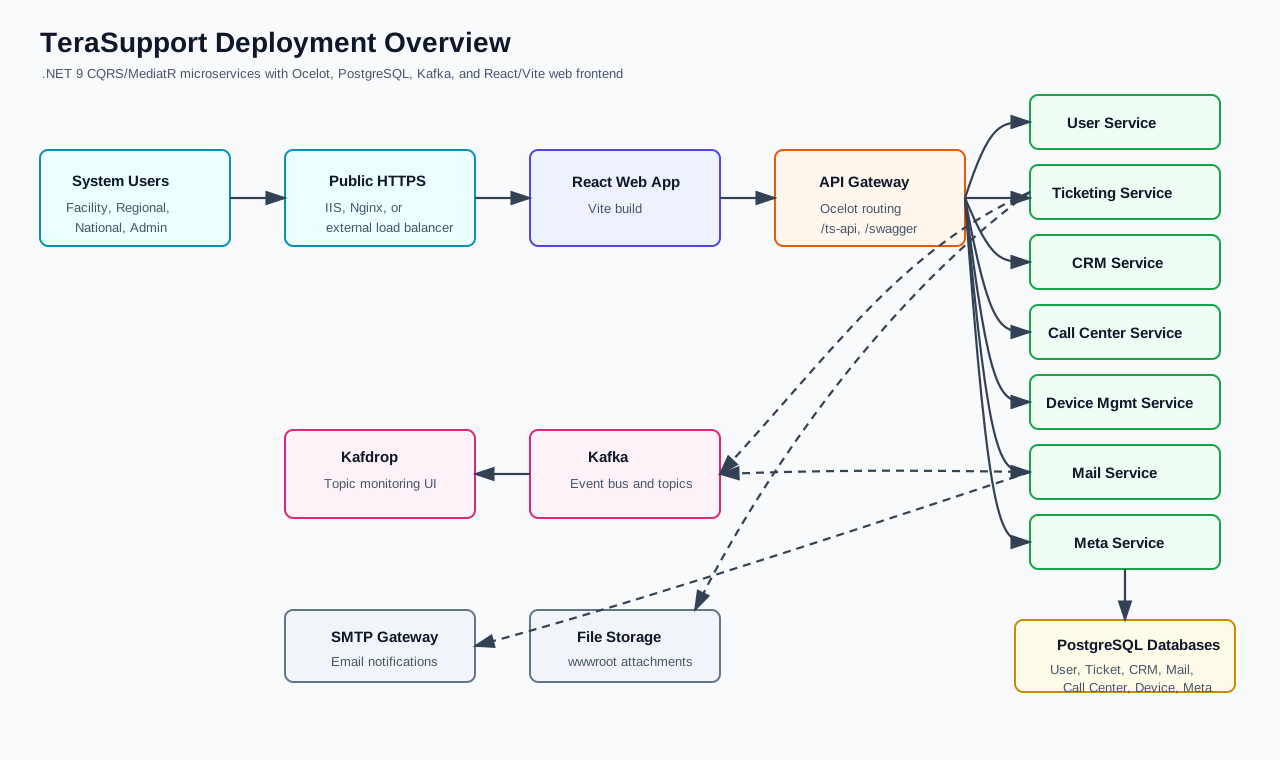
This diagram uses the same Docusaurus zoomable format as the Installation Manual so technical reviewers can inspect the service boundaries and infrastructure routing.
| Area | Architecture Detail |
|---|---|
| Entry Point | Users access the platform through public HTTPS, terminated by IIS, Nginx, or an external load balancer. |
| Frontend | React/Vite web app serves the user interface and calls backend APIs through the gateway route. |
| API Gateway | Ocelot API Gateway exposes stable public API routes and forwards requests to internal microservices. |
| Services | User, Ticketing, CRM, Call Center, Device Management, Mail, and Meta services run as .NET 9 CQRS/MediatR services. |
| Data | PostgreSQL databases are separated by service domain to reduce coupling and simplify ownership. |
| Events | Kafka handles asynchronous ticket, mail, user request, notification, and CRM/deal events. |
| Operations | Kafdrop, logs, IIS/Portainer, and database tools are used for deployment verification and support. |
Supported deployment models:
| Model | Description |
|---|---|
| Windows Server / IIS | IIS hosts frontend and proxies or hosts .NET services. |
| Linux / Docker / Portainer | Portainer manages Docker containers and persistent volumes. |
7.4 Application Components
| Component | Description |
|---|---|
| Frontend Web App | Provides admin, service desk, reporting, and facility portal user interfaces. |
| User Service | Handles authentication, users, roles, and permissions. |
| Ticket Service | Handles tickets, categories, assignments, messages, attachments, and lifecycle actions. |
| Device Service | Maintains facility/device reference data where applicable. |
| Notification Worker | Processes notification events and dispatches emails or external messages. |
| API Gateway | Provides a stable public API routing layer. |
7.5 Data Architecture
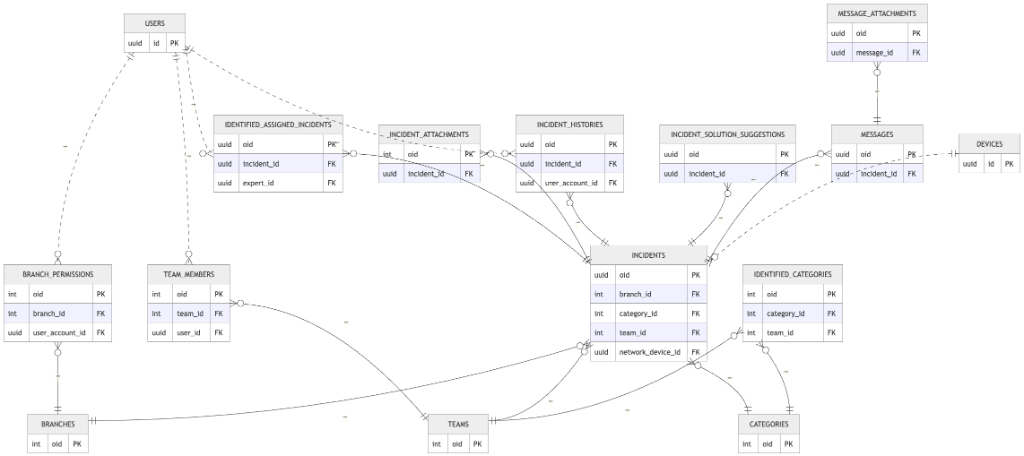
The platform uses PostgreSQL with service-oriented database ownership.
| Database | Main Data |
|---|---|
| User database | Users, roles, organizations, access control. |
| Ticket database | Tickets, categories, assignments, messages, attachments, audit activity. |
| Device database | Devices, facilities, external sync flags, device metadata. |
See Data Architecture for detailed table definitions and schema references.
7.6 Ticket Lifecycle Design
The main ticket workflow is:
- Ticket is created from portal, email, or internal form.
- Ticket category is selected or identified.
- Service Desk assigns the ticket to an expert or responsible person.
- Users communicate through ticket messages and attachments.
- SLA and overdue rules are monitored.
- Ticket is closed after resolution.
- Notifications and audit history are retained.
See Ticket Lifecycle and Journey and Process Workflows for visual flows.
7.7 Security Design
| Security Area | Design |
|---|---|
| Authentication | JWT-based user authentication. |
| Authorization | Role and permission checks in frontend and backend service policies. |
| Transport security | HTTPS for public access. |
| Service-to-service security | mTLS recommended between internal services. |
| Event security | Kafka SSL/TLS and SASL/SCRAM where enabled. |
| Attachment security | Object storage with time-limited download links. |
| Audit integrity | Activity records retained for accountability. |
See Security Architecture for additional security notes.
7.8 Integration Design
The platform can integrate with:
- SMTP / MoH Mail Gateway for email alerts.
- Kafka for asynchronous events.
- Object storage such as MinIO or S3 for attachments.
- Twilio WhatsApp Gateway if enabled in the deployed environment.
- External device or facility systems if synchronization is configured.
See Integration Documentation.
7.9 Operational Design
| Concern | Design Guidance |
|---|---|
| Logging | Application, IIS/container, database, and reverse proxy logs should be retained. |
| Backup | PostgreSQL and object storage backups are required. |
| Monitoring | Monitor API health, disk, memory, database, Kafka, and SMTP delivery. |
| Recovery | Restore database, attachments, and configuration together. |
| Scaling | Scale frontend and stateless API services horizontally where supported. |
| Handover | Transfer deployment scripts, environment values, credentials, and operational runbooks securely. |
7.10 Key Technical Risks
| Risk | Mitigation |
|---|---|
| SMTP outage | Queue notification events and retry delivery. |
| Kafka outage | Use retry and outbox pattern where supported. |
| Database growth | Apply indexing, archiving, and backup retention policies. |
| Incorrect role mapping | Verify role matrix before go-live. |
| Wrong category mapping | Test each category route with sample tickets. |
| Attachment storage failure | Monitor object storage capacity and backup attachments. |