12.2 Deployment & Testing
This section summarizes how the deployed platform is arranged and how the release should be verified after deployment.
12.2.1 Deployment Flow
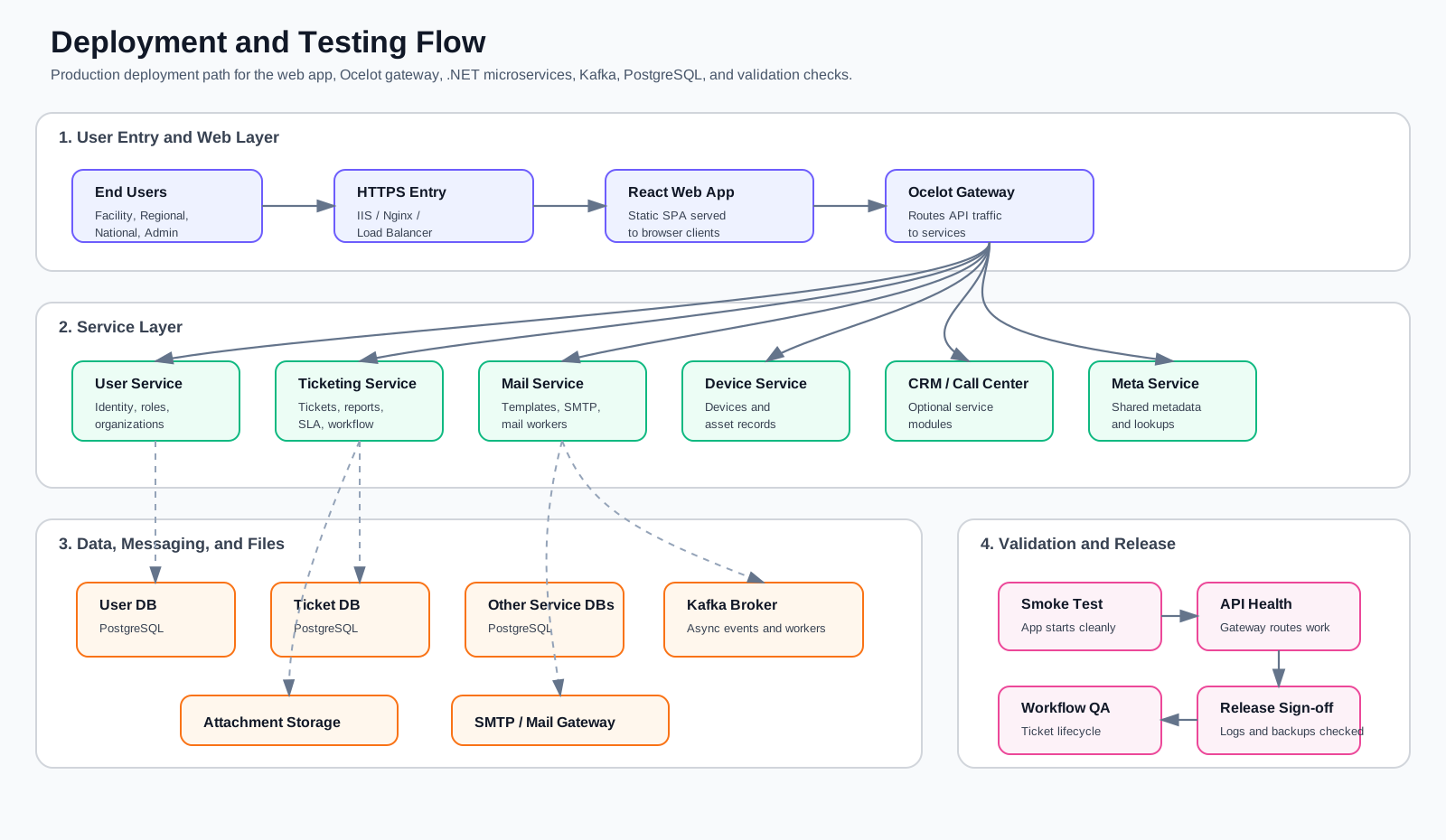
The deployment begins at the public HTTPS entry point. Users access the React web application through IIS, Nginx, or a load balancer. The web application then sends API traffic to the Ocelot API Gateway, which routes requests to the required .NET microservice.
Each service owns its own database and runtime responsibility. The User Service manages organizations, users, facilities, regions, roles, and access. The Ticketing Service manages the service desk ticket lifecycle, assignments, reports, SLA logic, messages, and attachments. Supporting services such as Mail, Device, CRM, Call Center, and Meta run beside the core services when enabled.
Kafka is used for asynchronous communication between services and background workers. PostgreSQL stores each service database. Attachments are stored outside the relational tables as file/object paths, and email delivery is handled through the configured SMTP or mail gateway.
12.2.2 Deployment Validation
After deployment, verify the release in this order:
| Step | What to Verify |
|---|---|
| Application startup | Web app, API gateway, and all required services start without runtime errors. |
| Network routing | Public HTTPS routes to the web app and API gateway routes to the correct services. |
| Database connectivity | Each service can connect to its configured PostgreSQL database and run migrated schema queries. |
| Kafka connectivity | Kafka broker is reachable and event-producing services can publish/consume expected events. |
| File access | Ticket and message attachment upload/download paths work. |
| Mail delivery | SMTP or mail gateway sends notification emails from the deployed environment. |
| User access | Administrator, National, Regional, and Facility users can sign in and reach their expected menus. |
| Ticket workflow | Ticket creation, assignment, message reply, resolution, closure, and reporting flows work end to end. |
12.2.3 Testing Scope
Testing should cover smoke testing, role-based access, workflow testing, integration testing, and operational checks.
| Area | Minimum Test |
|---|---|
| Smoke test | Open the web app, sign in, load dashboard, and confirm no critical browser/API errors. |
| Role access | Confirm each role sees only the expected modules, menus, facilities, reports, and actions. |
| Ticket workflow | Create a ticket, assign it, add a message, attach a file, resolve it, and confirm it appears in reports. |
| Reports | Confirm dashboard/report counts match the selected organization and date filters. |
| Integrations | Confirm Kafka, mail, attachment storage, and API gateway routes work in the deployed environment. |
| Operations | Check service logs, gateway logs, database logs, backup schedule, and restart behavior. |
12.2.4 Release Readiness
A deployment is ready for handover when the environment is reachable, core workflows pass, reports load correctly, logs are clean, secrets are stored outside public documentation, and rollback/backup steps are known by the operations team.