12.1 Data Architecture
This section documents the migrated database model for the MoH Helpdesk platform. The current implementation uses separate PostgreSQL databases per service. This page focuses on the two core service databases requested for handover:
- User Service database: identity, organization, facility, access, package, and automation configuration.
- Ticketing Service database: ticket lifecycle, assignment, categorization, conversation, attachment, SLA, and reporting source data.
The tables below are based on the Entity Framework Core model snapshots and entities currently migrated in the codebase.
12.1.1 Shared Entity Pattern
Most migrated entities inherit a common audit model.
| Field | Purpose |
|---|---|
CreatedBy | User or service actor that created the row. |
DateCreated | Creation timestamp. |
ModifiedBy | User or service actor that last changed the row. |
DateModified | Last modification timestamp. |
OrganizationId | Logical tenant/organization boundary. |
IsDeleted | Soft-delete flag. |
IsSynced | Internal sync flag. |
IsTPSynced | Third-party sync flag. |
IsArchived | Archive flag. |
Cross-service references are stored mainly as GUIDs. For example, Ticketing stores ContactId, FacilityId, ExpertId, and OrganizationId as logical references to User Service records instead of enforcing database-level foreign keys across service databases.
12.1.2 User Service Data Model
The User Service owns platform identity, organizations, facilities, regions, contacts, service access, roles, packages, user requests, and notification automation settings.
User Service Tables
| Table | Primary Key | Main Fields | Purpose |
|---|---|---|---|
UserAccounts | Oid | FirstName, Surname, Email, Cellphone, Password, RegionId, UserType, IsSystemAdministrator, IsActive | Stores internal system users such as administrators, national users, regional users, and support users. |
Biometrics | Oid | Image, Fingerprint | Stores biometric data linked one-to-one with a user account. |
Organizations | Oid | Name, Address, City, State, ExpiryDate, ContactNumber, OrganizationSuffix, IsPublicPortalConfigured, IsActive, Status | Stores tenant or client organizations. |
IdentifiedOrganizations | Oid | UserAccountId, OrganizationId, IsActive, IsAdministrator | Maps users to organizations and marks organization-level administrators. |
AssignedOrganizationServices | Oid | OrganizationId, Service | Defines which platform services are enabled for an organization. |
Regions | Oid | Name | Stores geographic or operational regions. |
Companies | Oid | Name, Description, Address, PrimaryPhone, Email, Website, RegionId, FacilityCode | Stores facilities/companies and links them to regions. |
Contacts | Oid | FullName, Email, Phone, CompanyId, Password | Stores external/facility contacts who can report or own tickets. |
Departments | Oid | Name, Description | Stores organizational departments. |
IdentifiedUserDepartments | Oid | DepartmentId, IdentifiedUserId | Maps an organization-scoped user to departments. |
IdentifiedUserAccesses | Oid | Services, UserAccountId | Defines a user's service-level access. |
IdentifiedUserRoles | Oid | IdentifiedUserAccessId, Roles | Defines service roles for a user's service access. |
IdentifiedRoleActions | Oid | Role, Feature, ActionType | Defines role-to-feature/action permission rules. |
LoginHistories | Oid | LoginDateTime, IsLoggedOut, UserId | Stores login session history for audit and activity tracking. |
Packages | Oid | Title, Description, IsActive | Stores commercial or subscription package definitions. |
PackageFeatures | Oid | PackageId, Description | Stores feature rows under each package. |
UserRequests | Oid | OrganizationName, RequestDate, FirstName, Surname, Email, Cellphone, RequestStatus, Gender | Stores onboarding or access requests before final account setup. |
AutomationRules | Oid | ServiceType, EventType, IsCreate, AutoAssignTime, Description, OrganizationId | Stores notification/automation rules per service, event type, and organization. |
AutomationChannels | Oid | AutomationRuleId, Channel | Stores delivery channels for an automation rule. |
IdentifiedAutomationRoles | Oid | AutomationChannelId, Role | Stores recipient roles for an automation channel. |
User Service Relationship Diagram
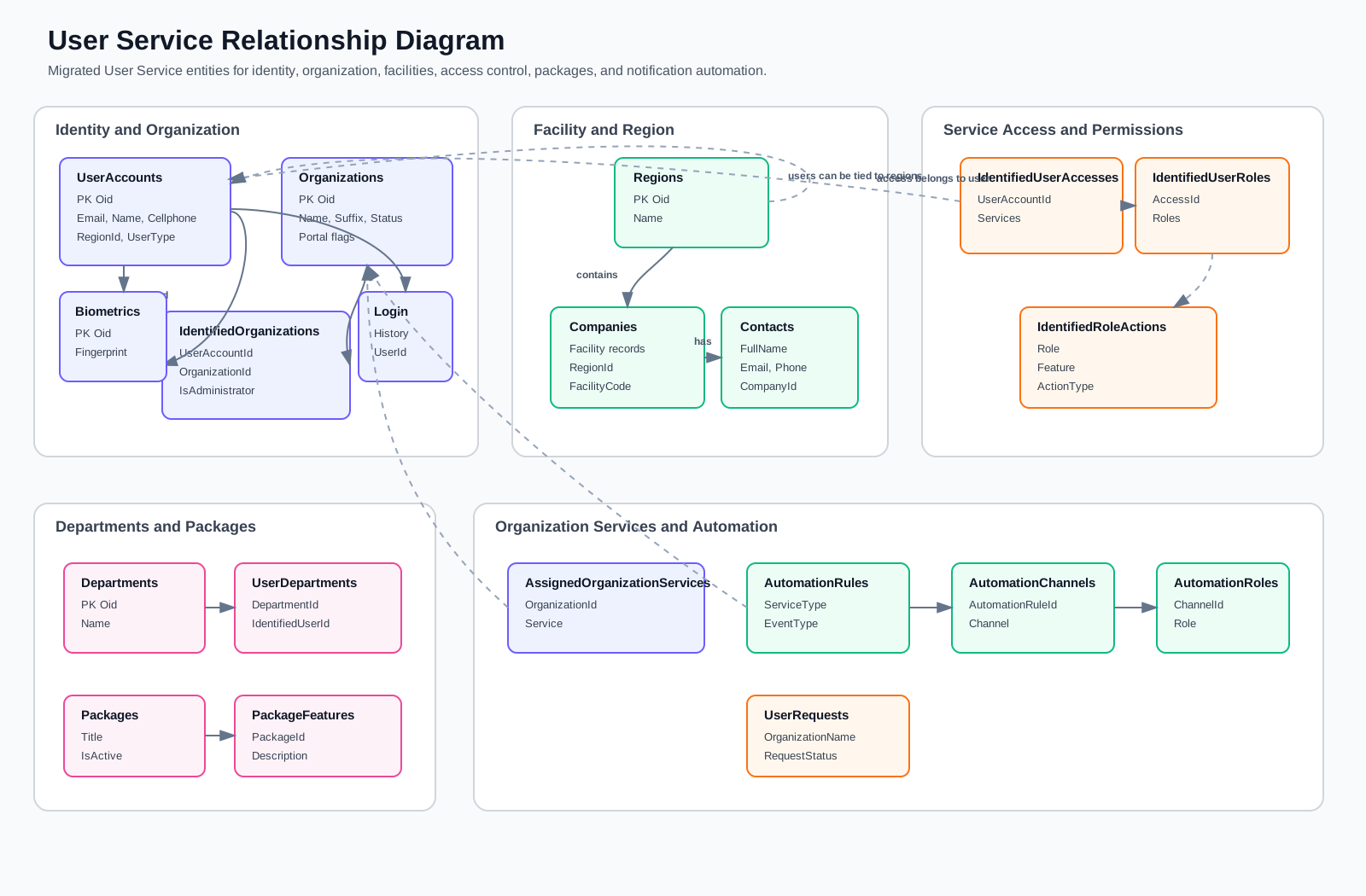
User Service Notes
The migration defines these important relationships:
| Relationship | Meaning |
|---|---|
| Organization to Identified Organizations | One organization can have many assigned users. |
| User Account to Identified Organizations | One user can be assigned to many organizations. |
| Region to Companies | One region can contain many facilities/companies. |
| Region to User Accounts | A regional user can be tied to a region. |
| Company to Contacts | One facility/company can have many reporting contacts. |
| User Account to Access to Roles | Service-level permissions are assigned through access records and role records. |
| Automation Rule to Channels to Roles | Notification rules define channels and recipient roles. |
The User Service has a composite unique index on automation rules for ServiceType, EventType, and OrganizationId, preventing duplicate automation rules for the same service/event/organization combination.
12.1.3 Ticketing Service Data Model
The Ticketing Service owns service desk tickets and all local data needed to classify, route, assign, discuss, attach, resolve, audit, and report on tickets.
Ticketing Service Tables
| Table | Primary Key | Main Fields | Purpose |
|---|---|---|---|
Incidents | Oid | SLNumber, TicketTitle, Description, DateResolved, IsAssigned, IncidentStatus, IncidentSource, DueDate, IncidentPriority, IncidentCreateMethod, TicketType, FacilityId, ContactId, MailThreadId, CategoryId, TeamId, ApplicationId, BranchId, Images | Central ticket/case table. Stores ticket identity, status, SLA dates, source, priority, ownership references, category/team routing, and external references. |
Applications | Oid | Name | Stores application/system names used to classify incidents. |
Branches | Oid | Name, Description, IsActive | Stores branch/location records used by tickets and branch permissions. |
BranchPermissions | Oid | BranchId, UserAccountId, IsActive | Maps users to branches for access control. |
Categories | Oid | Name, Description, ParentCategoryId | Stores ticket categories and parent-child category grouping. |
Teams | Oid | Name, Description, IsAssigned | Stores support teams. |
TeamMembers | Oid | UserId, TeamId, IsTeamLead, IsPrimaryTeam | Maps user IDs to teams. |
IdentifiedCategories | Oid | CategoryId, TeamId | Maps categories to teams for routing/assignment. |
IdentifiedAssignedIncidents | Oid | Description, DateIdentified, AllowAccess, IncidentId, ExpertId, TeamId | Stores incident assignment history and current access/ownership records. |
Messages | Oid | MessageDate, Description, IsInternal, IsResolution, IsOpen, IncidentId, EmailMessageId | Stores ticket conversation entries, internal notes, and resolution messages. |
MessageAttachments | Oid | AttachmentPath, MessageId | Stores file references attached to ticket messages. |
IncidentAttacments | Oid | AttacmentPath, IncidentId, MailAttachmentId | Stores file references attached directly to incidents. The migrated table name preserves the existing spelling. |
IncidentHistories | Oid | Description, ActionType, ActionDate, FieldName, OldFieldValue, NewFieldValue, IncidentId, UserAccountId, ContactId | Stores ticket audit history and field-change records. |
IncidentSolutionSuggestions | Oid | IncidentId, SourceIncidentId, SourceSLNumber, SuggestedSolution, SimilarityScore, IsAiVerified, AiVerificationReason, Status, CustomerRespondedAt, CustomerMessageId | Stores AI/similar-ticket solution suggestions for resolution support. |
PriorityConfigurations | Oid | Priority, TimeInMinutes | Stores SLA time configuration by ticket priority. |
Ticketing Service Relationship Diagram
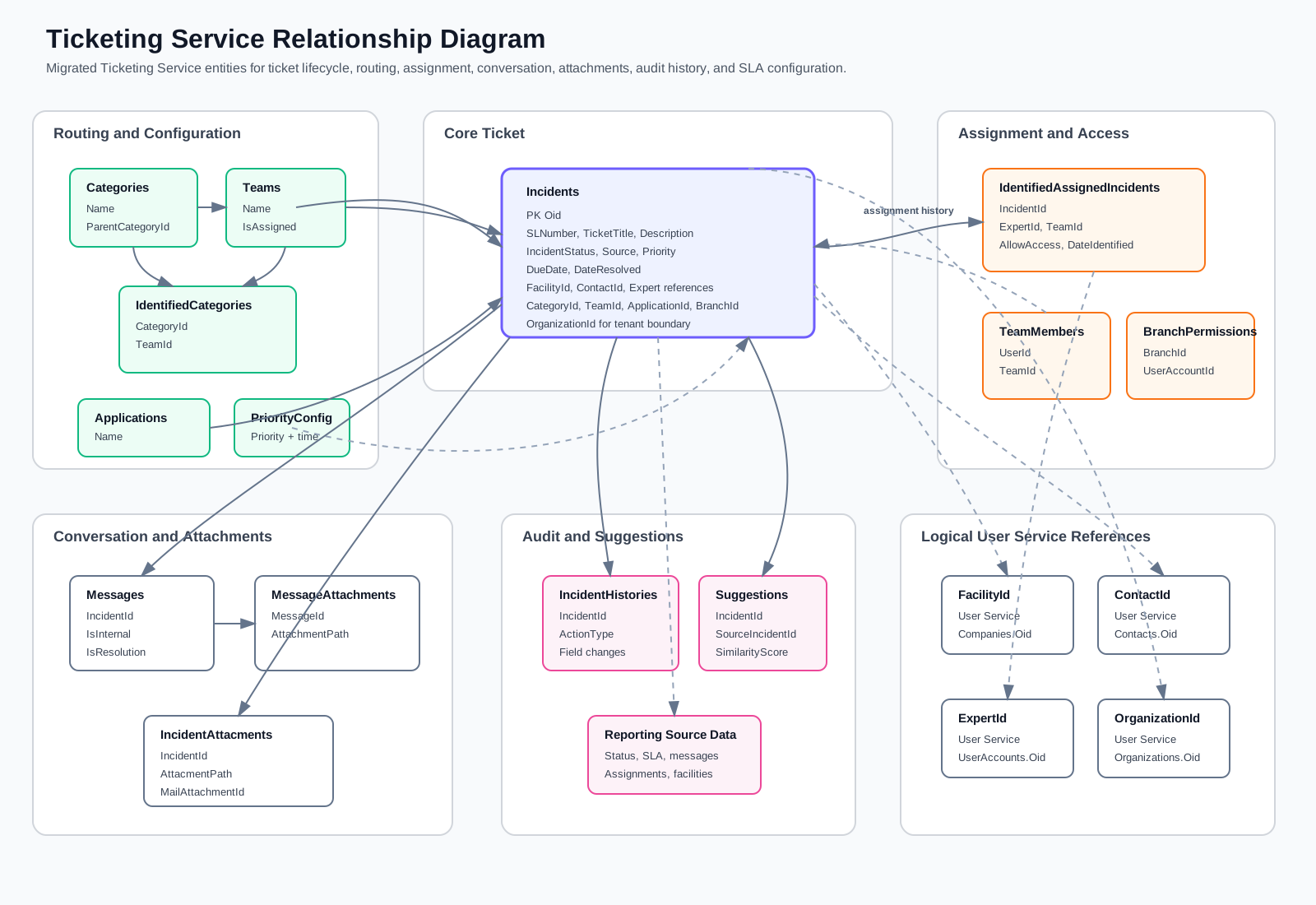
Ticketing Service Notes
The migration defines these important relationships:
| Relationship | Meaning |
|---|---|
| Incident to Category, Team, Application, Branch | A ticket can be classified by category, routed to a team, linked to an application, and optionally tied to a branch. |
| Incident to Messages | One ticket can have many conversation messages, internal notes, and resolution messages. |
| Incident to Identified Assigned Incidents | Assignment history is retained as separate rows, which supports reassignment and escalation reporting. |
| Message to Message Attachments | Message-specific files are stored separately from incident-level files. |
| Incident to Incident Attachments | Ticket-level attachments are stored as file paths linked to the incident. |
| Incident to Incident Histories | Field changes and lifecycle actions are audited against the ticket. |
| Category to Identified Categories to Team | Category-to-team routing is configurable through a mapping table. |
| Team to Team Members | Team membership is stored separately from the team definition and references User Service users by GUID. |
The Ticketing Service has a composite unique index on SLNumber and OrganizationId, so ticket serial numbers are unique inside each organization.
12.1.4 Cross-Service Logical References
The service databases remain independently owned. The following Ticketing fields are logical references to User Service data:
| Ticketing Field | Referenced User Service Concept |
|---|---|
Incidents.OrganizationId | Organizations.Oid |
Incidents.FacilityId | Companies.Oid |
Incidents.ContactId | Contacts.Oid |
IdentifiedAssignedIncidents.ExpertId | UserAccounts.Oid |
TeamMembers.UserId | UserAccounts.Oid |
BranchPermissions.UserAccountId | UserAccounts.Oid |
IncidentHistories.UserAccountId | UserAccounts.Oid |
IncidentHistories.ContactId | Contacts.Oid |
These relationships should be treated as service-level contracts rather than database-level foreign keys. The application resolves names and profile details through service calls when displaying ticket reports, assignments, contacts, facilities, and users.